by Mr Link » April 18, 2026, 2:59 pm
You are correct if you access the "Great Lakes & Seaway History" from the "Boatnerd News" drop down menu on the top of the home page. However, each day, another link is posted on the right hand side of the homepage. Here it is titled "On This Day" and if you click on the title, it will take you directly that day's write up.
As for photos, we are re-incorporating them as time permits. And yes, to address another comment, eventually most photos will display in a larger format if you click on them.
I am not sure what you meant by there is no organization to the section. Can you elaborate?
- Attachments
-
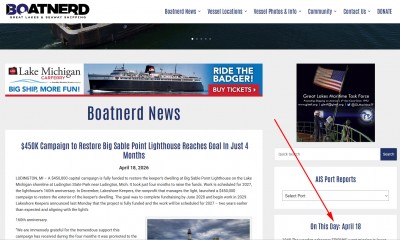
You are correct if you access the "Great Lakes & Seaway History" from the "Boatnerd News" drop down menu on the top of the home page. However, each day, another link is posted on the right hand side of the homepage. Here it is titled "On This Day" and if you click on the title, it will take you directly that day's write up.
As for photos, we are re-incorporating them as time permits. And yes, to address another comment, eventually most photos will display in a larger format if you click on them.
I am not sure what you meant by there is no organization to the section. Can you elaborate?